SEO ·
Why Doesn’t My Website Appear on Google? Diagnose It in 3 Minutes
“Why doesn’t my website appear on Google?” is the right question hiding three completely different problems, each with a different fix: a site that was never indexed, a site that is indexed but invisible, and a site that only shows up when someone types your company name. Most owners treat the wrong one because they never diagnosed first. This guide gives you two tests that take three minutes, tell you which of the three you have, and then fixes only yours — and three of these cases are twenty-minute self-fixes where you should pay nobody, including us.
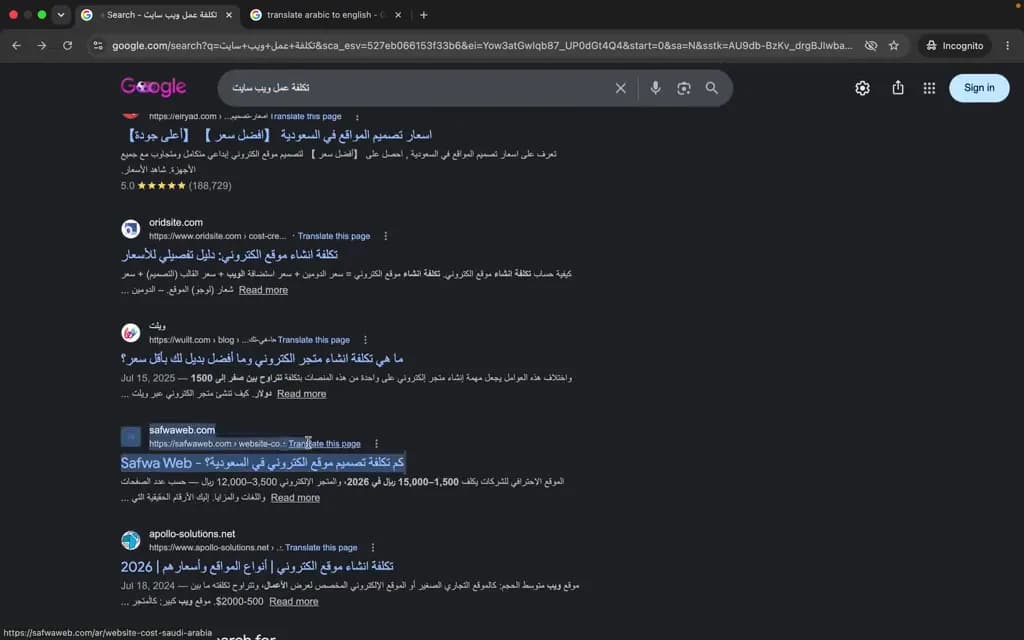
You probably ran the test yourself before landing here: you typed your company name into Google and your website was not there. Then you opened an article listing seventeen possible causes and came away more anxious and no wiser. The problem with those articles is not their facts, it is their order — they assume you have every cause at once, when you actually have one. We run this diagnosis on client sites most weeks, and the first step never changes: find the exact stage where the site stopped, then fix that stage only.
The image at the top of this article is a frame from a real screen recording, as the caption under it says, and you can watch the whole recording on our SEO services page. To be clear before we go further: what it shows is that day, not a promise of a permanent position — for us or for you. Checking the same thing for your own site is exactly what the next few minutes will teach you to do.
Quick answer: you have one of three problems — not seventeen causes
Every page travels to search results through three stages in order. Crawling: Google’s crawler reaches the page and reads it. Indexing: Google decides to add it to its index. Ranking: Google picks it for a specific search, ahead of competing pages. Arabic speakers usually say “الأرشفة” for the second stage, while Google’s own Arabic documentation calls it “الفهرسة” — same thing. Your site not appearing simply means it stopped at one of those three stages, and the treatment is completely different for each.
- Problem one — your site was never indexed: Google does not know your pages exist, or it knows and is blocked from reaching them. Nothing shows up for any search, not even your full company name.
- Problem two — your site is indexed but invisible: your pages really are in the index, but Google does not put them forward for any real search. This is the most common case in practice and the worst served by every article we read.
- Problem three — your site only shows for your company name: people find you by name and lose you the moment they search for the service you sell. This is not an indexing problem at all — it is competition.
The distinction is not academic. It is the difference between a twenty-minute fix and a monthly retainer you do not need. Someone with problem one who buys a content package has paid for a solution unrelated to their cause; someone with problem three who sits waiting to “get indexed” is waiting for something that happened months ago. So do not read this whole article — run the two tests below, then jump to the section that is actually yours.
The three-minute test: which of the three do you have?
You need no paid tool and no Search Console account for these two tests — a browser is enough. Open a private window first. In your normal window, results are shaped by your history and by every visit you have made to your own site, so you see a position your customer never sees. That alone explains half of all “it shows for me but not for anyone else” reports.
Test one: search Google for site:yourdomain.com
Type the word site, a colon, then your domain with no space: site:example.com, replacing example.com with your own. This asks Google to show only the pages of your site that are in its index. If you get a list of your pages, your site is indexed and problem one is off the table. If you get nothing at all, your site is almost certainly outside the index — that is problem one.
Two honest caveats. The result is a quick indicator, not an audit: the count Google shows is approximate and shifts between searches, and the only authoritative source on your pages is the Page Indexing report inside Search Console. Still, for most small and medium sites this settles the important question in seconds. Watch for a third outcome as well: only the homepage appears and the rest of the site is missing. That is partial indexing, and we come back to it below.
Test two: search for your exact company name
In the same private window, type your company name exactly as it appears on your commercial registration and on your website — and add the city if the name is generic. Scan the first two pages of results. Almost nobody competes with you for your own name, so if your site is indexed and technically healthy, it should be there near the top. This is the test that separates problem two from problem three.
If your site appears for your company name, Google knows it and trusts it enough to show it, and your real issue is competition for the words that describe your service. If it does not appear even though the site: test listed your pages, you are in the hardest and most common case: indexed but invisible. And if it is missing from both tests, you have your answer — problem one, your site is outside the index.
| What the two tests showed | Your problem | Go to |
|---|---|---|
| site: returns nothing, and your company name does not find you | Outside Google’s index | Problem one |
| site: lists your pages, but your company name does not find them | Indexed but invisible | Problem two |
| site: lists them, your name finds them, your service does not | Ranking and competition | Problem three |
| site: returns only the homepage or a handful of pages | Partial indexing | Problem one, then two |
Problem one: your site was never indexed
In this state your site has no presence in Google’s index, and no amount of content or keyword work matters until that changes. The genuine causes are few and most are fixed in minutes. Work through them in the order below — it runs from most likely to least.
The site is new — and this is normal
If your site went live days ago, you probably do not have a problem at all; you have a wait. Google states in its own guide on sites not appearing in search that indexing can take anywhere from a day or two to a few weeks, and it explicitly advises waiting at least a week after submitting a sitemap or an indexing request before assuming something is broken. There is no penalty for being new. It is a queue, not a punishment.
What to do during that week: create a Search Console account and verify ownership of the domain, submit your sitemap, then run the URL Inspection tool on your homepage and request indexing. Do not repeat the request daily — asking again for the same page does not speed anything up or raise its priority. Publishing real pages and linking them to each other is far more effective, because internal links are a stronger discovery route than any button.
robots.txt is blocking Google
Type your domain followed by /robots.txt in the browser and read what comes back. If you see Disallow: / under User-agent: *, you are telling every search engine not to crawl anything on your site. This is not rare at all: the line is added deliberately on the staging site during the build, then the site is moved to the live domain with the file intact. We have seen sites sit like that for months while their owners paid for content improvements.
One technical distinction worth a minute here: robots.txt blocks crawling, not indexing itself, and Google may still list a blocked URL without a description if other pages link to it. More importantly, blocking a page in robots.txt stops Google from ever seeing a noindex tag inside it, which leaves the page stuck between two states. The practical rule: block crawling only for things you never want visited, and use noindex for things you do not want shown.
A forgotten noindex tag on your pages
This is the number one real cause on small business sites in Saudi Arabia. WordPress has a setting under Settings → Reading that asks search engines not to index the site. It gets switched on during the build and everyone forgets it after launch. Every page then ships with a noindex instruction: Google visits, reads it, and leaves. The symptom matches exactly what you are seeing — a site that loads, works, and looks perfectly healthy, with no presence in search.
To check: open your page, view the page source, and search for the word noindex — or run the URL Inspection tool in Search Console, which tells you directly whether the page is excluded and why. If you find it, the fix is usually one checkbox plus a re-inspection request. This is one of the three cases where we say it plainly: do not pay anyone, you are two minutes from solved.
No sitemap, or one that was never submitted
A sitemap is a file listing your page URLs for Google, usually found at /sitemap.xml. Its absence does not prevent indexing and its presence does not guarantee it — it is a suggestion, not an instruction. But it shortens Google’s discovery work, and it matters in practice for new sites and for large sites with pages that few links reach. Submit it once in the Sitemaps section of Search Console, then check whether Google actually read it and when.
Nobody owns Search Console — the old agency took it
This case is distinctly Saudi and you will barely find it in competing articles: the site exists and works, but the company that built it created Search Console under its own email, or never created it at all. You are then diagnosing blind — you cannot see how many pages are indexed, you cannot open the Page Indexing report, and you have no idea whether Google has issued a manual action against the site. Plenty of owners discover this only when they ask why their website does not appear.
The good news is that you do not need anyone’s permission: Search Console ownership is proven by adding a TXT record in your domain settings or uploading a verification file to your hosting, and both are yours if you genuinely control the domain and the host. If the domain itself is registered in the agency’s name, your problem is bigger than indexing, and we wrote a separate step-by-step guide for it: how to take your website back from an agency that vanished. Start there, then come back to the diagnosis.
Problem two: your site is indexed but nobody sees it
This is where the site: test gets confusing: your pages are listed, so you are told “everything is fine,” and yet not one visitor arrives from search. It is the most common case in reality and the thinnest in the existing coverage — usually a subheading and three generic lines. The reason is that indexing is not one state but a set of degrees: Google may know your URL, may visit it, may add it to the index and still not show it, because it finds nothing there worth showing.
“Discovered – currently not indexed”: what it actually means
If you have Search Console access, open the Page Indexing report and read the reasons pages were excluded. The most common line you will see is “Discovered – currently not indexed” (“تم الاكتشاف ولم تتم الفهرسة” in Arabic), and it literally means Google knows the URL exists but has not visited it yet. There is a sibling state in the same report meaning Google did crawl the page and then chose not to add it — a blunter verdict: it looked, judged, and moved on.
In practice there are two causes and rarely a third. The first is technical: a slow server, or a large site full of near-identical pages, so Google spends less crawling on you. The second is judgemental: the page does not look worth the space in the index. This is why pressing “request indexing” ten times changes nothing. Three things actually move this state — internal links from important pages to the neglected one, a faster server, and a page that deserves indexing more than it did before.
Thin or machine-translated content
The pattern we see most in Saudi Arabia: a template site with one page per city, the same text throughout, with “Riyadh” swapped for “Jeddah” swapped for “Dammam”. Or a site written in English and machine-translated into Arabic, producing sentences no human would write. Google does not necessarily penalise these pages — it does something quieter and worse for you: it declines to index them, or indexes them and never shows them. One seriously written page is worth twenty identical ones.
No internal links reach the page
A page no link on your site points to is an orphan: it sits on the server, it may be listed in the sitemap, and there is no route to it from the homepage. Google reads importance partly from how many paths lead to a page and where it sits in the structure. A common local variant: the top navigation is built in a way that contains no real text links, so visitors see a working menu and Google sees nothing. Keep every page that matters one or two clicks from the homepage.
The site is slow on mobile
Google indexes the mobile version of your site, not the desktop one. If your mobile version is missing content or heavy to the point of stalling, that is what it sees and judges. Speed is a ranking factor, but its effect on indexing is indirect: a slow server means Google crawls fewer of your pages. Do not turn this into a six-month optimisation project — get an honest measurement of your pages on a real mobile connection, and fix the heaviest thing first.
Problem three: your site only shows for your company name
If searching your company name puts your site first, then it is indexed and technically healthy, and every section above is already settled for you. What you are actually complaining about is that you do not appear when a customer who has never heard of you searches for “construction company in Riyadh” or “debt collection lawyer”. That is a different problem in nature, in duration, and in cost — and it is only fair to say so rather than sell you a technical fix for a non-technical problem.
This is not an indexing problem — it is competition
When someone searches for your service, Google is not asking “does this site exist?” It is asking “which of these ten candidate pages is most useful to this searcher?” And that is decided by things indexing has nothing to do with. Do you have a page dedicated to that exact service, or one line inside a generic “our services” page? Does the page answer the question the searcher actually has? Does anyone mention you off your own site? Is your Google Business Profile correct and reviewed recently, if you serve one city? That is the work of search engine optimisation, and it is measured in months, not days.
Competition is local too: “web design” in Saudi Arabia is not the same search in every city, and Google’s results shift with the searcher’s location. That is why we build clients real city pages rather than duplicated ones, like our own web design in Riyadh page. The broader the phrase, the more crowded it is and the longer the road; the more specific it is — one service, one city — the sooner you appear and the more commercially useful that appearance is.
Store on Salla or Zid? That case is different
Most Saudi stores run on hosted platforms like Salla and Zid, and visibility there has its own checks. Verify three things in order. Is your store on your own domain, or still on the platform’s default subdomain? Is it actually published rather than sitting in a coming-soon state? And are your product descriptions copied straight from the supplier, word for word, the same text as dozens of other stores? That third one explains most cases of “my store is indexed but gets no traffic”.
Then accept a natural limit of any hosted platform: you control content, titles and descriptions, not every technical detail underneath. That is not a flaw in itself, but it means your result is built from what you can change — seriously written category pages, product descriptions in your own words, and pages answering the questions your customers actually ask. We compared the platforms in detail in a separate guide: Salla vs Zid vs Shopify.
How long does it really take? The straight answer
The usual answer to this question is “from days to weeks” with nothing behind it, which helps nobody. The time depends entirely on which problem you have, and the table below separates them. These are ranges based on what Google documents and what we see in our own work — they are not promises, and nobody can give you a date. Anyone who does is guessing and calling the guess a guarantee.
| Situation | Realistic timeframe | What you must do |
|---|---|---|
| New site with a submitted sitemap | Days to weeks — Google advises waiting at least a week before judging | Verify ownership, submit the sitemap, inspect the homepage and request indexing |
| New page on an already-indexed site | Usually days | Link it from an important page, then request indexing once |
| Removing a noindex tag or a robots.txt block | Days to two weeks after re-crawling | Fix the cause, then re-inspect with the URL Inspection tool |
| “Discovered – currently not indexed” on a large site | Weeks, and some pages may never be indexed | Internal links, a faster server, and merging near-identical pages |
| Going from indexed to ranking for competitive terms | Months, with continuous work | Real content per service, off-site mentions, a correct Business Profile |
And a question that keeps coming up in 2026: what about Google’s AI answers? There is no separate route into them and no form where you submit your site — the sources cited in those answers come from indexed pages. In other words the order of work has not changed: get indexed, then earn the appearance. Anyone selling “appearing in AI answers” as a separate service is selling you a new name for old work.
When to fix it yourself, and when you need someone
The thing that irritates us most about this market is how often minutes of work get sold as projects. So plainly: if your diagnosis ended on any of the items below, fix it yourself and pay nobody — not us, not anyone else.
- The “discourage search engines” setting is on in WordPress: switching it off takes two minutes, then request a re-inspection.
- A Disallow: / line in robots.txt carried over from the staging environment: deleting it takes minutes.
- No sitemap submitted: creating the account and submitting it takes under twenty minutes.
- The site is days old: do nothing beyond submitting the sitemap and waiting a week — this is not a problem.
- You do not have Search Console: verify ownership yourself with a TXT record; you do not need the old agency’s permission.
So when is a specialist worth it? When the site stays out of the index after you have fixed all of the above and waited two weeks. When there is a manual action in Search Console. When a site that used to appear vanished after a redesign or a hosting move. Or when yours is problem three — competing for terms your competitors have been working on for years. Those four need time and experience; they are not buttons to press.
As for what it costs, we are not answering that here with numbers, because this article is about diagnosis, not pricing. We explain what websites actually cost in the Saudi market, in real ranges for each type of business, in our website cost guide. Read it after you know your problem, not before — someone who knows their problem knows what is worth paying for, and what is not.
The final checklist
Print it or save it, and work through it in order. The first item that comes back negative is your problem — stop there and do not continue:
- Search site:yourdomain.com in a private window: do your pages appear?
- Search your exact company name: are you in the first two pages?
- Open /robots.txt: is there a line blocking crawling of the whole site?
- View your page source and search for noindex, or inspect the page with the URL Inspection tool.
- Confirm you have real Search Console access under your own name, not the builder’s.
- Submit the sitemap once, and check that Google has read it.
- Review the Page Indexing report: how many pages are indexed, and why were the rest excluded?
- Open your site on your phone on mobile data rather than Wi-Fi: does it load completely in seconds?
- If everything passes and you still do not appear for your service: your problem is competition, and the fix is content and time.
One last piece of advice: do not treat three problems at once. Fix what you diagnosed, leave it a week, then rerun both tests. Most people who conclude that “nothing works” changed ten things in a single day and cannot tell which one helped and which one hurt. Diagnose, make one fix, measure — that is the method, and it is exactly as dull as it is effective.
Frequently asked questions
How long until a new site appears on Google?
Google’s documentation says indexing can take from a day or two to a few weeks, and it advises waiting at least a week after submitting a sitemap or an indexing request before assuming something is wrong. Use that week to verify ownership in Search Console, submit the sitemap, and publish your core pages linked to each other. If two weeks pass with no page appearing in a site: search, the problem is not the wait.
Why does my site show with site: but not in normal results?
Because indexing and ranking are two different things. A site: search only tells you a page is in Google’s index; appearing in a real search means Google chose it over competing pages. If your site appears for your company name but not for your service, your problem is competition and content. If it does not appear even for your company name, review page quality and internal links first.
What does “Discovered – currently not indexed” mean?
It means Google knows the URL exists but has not visited it yet and has not added it to the index. The two usual causes are crawl limits on slow or very large sites, and a page that does not look valuable enough to index. Repeating the indexing request does not fix it; internal links from important pages, a faster server, and improving or merging the page do.
Can my site appear without Search Console?
Yes. Search Console is not a requirement for indexing — Google discovers sites through links and indexes them whether or not you have an account. But it is the only tool that shows you what Google sees on your site: how many pages are indexed, why others were excluded, and whether a manual action exists. Indexing works without it; diagnosis does not.
How do I get my website to show up in Google search?
In order: make sure the site is not blocked by a noindex tag or by robots.txt, verify ownership in Search Console, submit your sitemap and request indexing for the homepage, then link your pages so every important one is a click or two from the homepage. After that the question stops being visibility and becomes ranking, which needs real content per service and time.
My site suddenly vanished from Google. What happened?
A site that used to appear and then disappeared has a short list of likely causes: a redesign or hosting move that carried a noindex tag over from staging, changed URLs without redirects, an expired domain or SSL certificate, or a manual action from Google. Start with the URL Inspection tool on a page that used to rank, and check the manual actions and security sections. This case deserves a fast check, not a wait.
Do Google Ads help my site rank in the free results?
No. Google Ads is a completely separate track from organic results. Ad spend does not buy an organic position and does not speed up indexing. Ads are useful for bringing in traffic while you build organic visibility, but they do not build it. Anyone telling you otherwise is selling you an illusion.
My Salla store does not appear on Google — why?
Check three things in order: is the store actually published rather than in a coming-soon state, is it on your own domain or still on the platform’s default subdomain, and are your product descriptions copied word for word from the supplier and repeated across dozens of stores? That third one is the most common reason a store shows up in a site: search but receives no visitors.
Can I pay someone to speed up indexing?
No. Google does not sell indexing and there is no paid route that puts your site in the index faster. What a specialist can do is remove whatever is blocking indexing — a noindex tag, a robots.txt block, a poor link structure, a slow server — and that is real work that can genuinely speed up the outcome. But “guaranteed indexing in 24 hours” for a fee is selling something the seller does not own.