Real Estate Developer Website: What It Needs in Saudi Arabia, and What Everyone Forgets
Web Design ·
A real estate developer website in Saudi Arabia needs five things before any colours or fonts: (1) a page for every project, (2) a path that delivers every enquiry to your sales team with the project name attached, (3) your licence numbers on show, (4) a Google Search Console account from day one, and (5) an admin panel your team can add projects from. This guide comes from our meetings with developers, contractors and brokers in Riyadh: what they ask for, what they forget, and how to write requirements any agency can price accurately.
If your company already has projects and a website built years ago, this guide is for you first. Most of what you will read here is what we add when we rebuild sites like that.
The requirement files we receive list features, but the real requirements come out in the first meeting, when the owner asks: how will enquiries reach our sales team? Can we add a new project ourselves? Where do we show project photos? This guide puts those questions in front of you before the meeting, not after it.
Who is this guide for? Five kinds of real estate companies
The Saudi property market is not only developers. The companies that contact us about a real estate website are usually one of five kinds, and each needs its website to do a different job:
| Type of company | The website’s first job | Pages it can’t do without |
|---|---|---|
| Developer that builds and sells its own projects, ready or off-plan | Turn a visitor into an enquiry about a specific project | A page per project, a “Register your interest” form, a brochure PDF |
| Contractor that builds and sells its own units | Prove build quality and sell the units | Delivered projects with real photos, pages for the units on sale |
| Contractor that builds for others or subcontracts the work | Win contracts from developers and clients | Past work, certificates, a “Request a quote” form |
| Partners sharing the cost and profit of one large project | Show who stands behind the project | A project page that names the partners and their roles |
| Broker or real estate office | Show many listings that change all the time | Search and filters, a page per property, the ad licence number on every listing |
Where do your buyers come from? The answer decides your website’s job
Before you choose a design, know how your buyers reach you. We see two routes in the market, and many companies use both:
- Ads: active developers advertise on Google, Snapchat, TikTok, Instagram and Facebook at the same time. Here the website is where the paid click lands, so every project page must turn it into an enquiry that carries the project name and the lead source. Without that, you pay for ads and can’t tell which project or platform brought the buyer.
- Reputation: many companies build trust inside their own circle, and their projects come from there. Here a buyer hears your name and then searches for it on Google, so the website’s job is to confirm what they heard: delivered projects with real photos, licence numbers, and a clear way to get in touch.
The difference changes your priorities. An ad-driven company starts with the enquiry path; a reputation-driven company starts with the trust pages. A good website serves both.
Which pages does a real estate company website need?
A real estate company website needs seven core pages: Home, About, Projects, a page for each project, Gallery, Brochures, and Contact. Anything beyond them depends on your type of company. Here is what goes on each:
| Page | What goes on it |
|---|---|
| Home | Current projects, one clear button such as “Register your interest” or “Request a quote”, plus call and WhatsApp buttons |
| About | The company story, commercial registration, licences, and delivered projects |
| Projects | A list of every project and its status: available, under construction, or sold |
| Project page | Every detail of the project and the enquiry form; see the next section |
| Gallery | Real photos from sites and delivered projects, added by your team from the admin panel |
| Brochures and catalogue | PDF files your team uploads without calling the developer |
| Contact | A short form, a map, phone numbers, and an official company email |
| News or blog (optional) | Project launches and construction progress, which give Google fresh content about your company |
What goes on a project page?
The project page is the most important page on any real estate developer website, because buyers land on it straight from an ad or a search. Put this on it:
- Real photos or 3D renders, and a video if you have one.
- The location on a map and the district name.
- Unit types, sizes and number of bedrooms.
- Construction stage, handover date and availability.
- A “starting from” price; the next section explains why.
- The brochure PDF, with the file size shown next to the download button.
- The licence number: the off-plan sales licence or the real estate ad licence.
- A short “Register your interest” form: only name and mobile number are required.
- A WhatsApp button with a ready message that includes the project name, so the sales rep knows which project the buyer is asking about.
Should you show the unit price on the project page?
We advise against a fixed price, because unit prices move up and down a lot. But don’t hide the price completely either.
The middle ground is “starting from”: a number that gives buyers a sense of the price level, so they reach you prepared. We see the same in our own business: the page where we publish our prices brings us most of our calls.
REGA’s Regulation for Real Estate Marketing and Advertising bans ad details that contradict reality. So make your “starting from” price the price of a unit that is actually available, and update it whenever it changes.
Your REGA ad licence number: where does it go on your website?
Put your licence numbers in three places on your website:
- The footer of every page, and your About page: your commercial registration and licence numbers.
- Every off-plan project page: the off-plan sales licence number.
- The page of every ready unit you sell: the ad licence number with its QR code. Take the unit’s page down as soon as it sells or its ad licence expires.
Many of our real estate clients hold every licence they need but never show them on their website. That is a loss: a visible licence number reassures buyers before they call, and it keeps you on the right side of the rules. Buyers can check an ad licence through the inquiry service on REGA’s online platform.
In May 2026 the Real Estate General Authority (REGA) published its Regulation for Real Estate Marketing and Advertising. It covers all real estate marketing and advertising, including social media, online property platforms, billboards and exhibitions. What matters for your website:
- Every real estate ad needs an ad licence before it is published.
- The ad must show set details, including the ad licence number, its expiry date and the advertiser’s licence number. It may instead show just the ad licence number and a QR code that leads to the rest.
- A company licensed to market a whole project, such as an off-plan project, does not need a separate ad licence.
- An ad must come down as soon as its purpose ends or its licence expires, whichever comes first.
This is general information, not legal advice. Read the full regulation or contact REGA before you launch your campaigns.
The AI-written requirements file: why isn’t it enough?
People who contact us about a real estate company website come in two kinds. The first sends a PDF written by ChatGPT or another AI tool and says: here are our requirements, give us a price, and tell us whether you can build it. The second asks to see our past work, then says: we want a site like this, let’s discuss it in a meeting.
The trouble with the first kind is that the file looks complete but rarely says what the company actually needs. Every file of this kind we have received reads almost the same. So in the meeting we ask again the questions that decide the website and its price: how will we connect the site to your CRM? Do you need a catalogue page? A photo gallery? A “Request a quote” button on the home page? The option to upload PDFs?
Use AI if you like, but think first about what your own company needs. A company that thinks before it sends gets a more accurate price and a better-fitting website.
8 questions to answer before you send your requirements
- Who are your buyers, and where do they come from: ads, reputation, or both?
- How many projects do you show today, and how many do you add each year?
- Who receives each enquiry, and where: a CRM (which one?), the company email, or a WhatsApp number?
- What will your team update itself: projects, photos, brochures, or news?
- Which files will you publish: brochures, a catalogue, or licences?
- Do you need Arabic and English, or Arabic only?
- Which button matters most on the home page: “Register your interest”, “Request a quote”, or WhatsApp?
- What do you want to see in the first version before you make the large payment?
It is the same approach we recommend to app founders in our guide on what to prepare before you ask for an app quote: one clear page beats a long file nobody understands.
How does an enquiry reach your sales team?
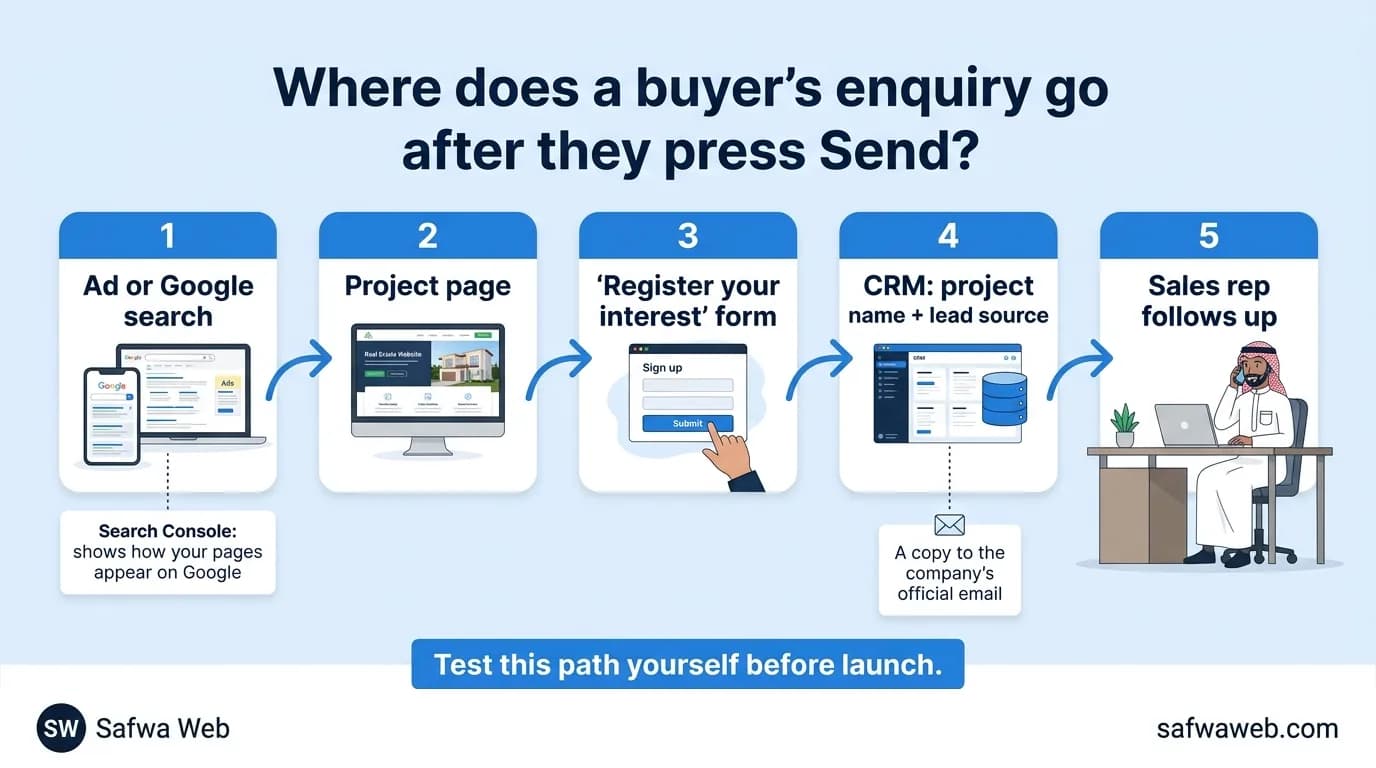
This question shows whether a website sells or only looks good. The right path: an ad or a Google search, then the project page, then a short form, then a CRM that receives the enquiry with the project name and lead source, then a sales rep who follows up.
Three small details make the difference:
- Many buyers type their mobile number in Arabic digits (٠٥…). Convert them to Western digits before sending them to the CRM, or it may reject them or save them wrongly.
- Send a copy of every enquiry to the official company email, so no buyer is lost if the connection ever fails.
- Ask your CRM vendor for an API that lets the website create new projects in the CRM directly.
We learned that last one with Roof, a Riyadh real estate developer that uses the Reterra CRM. In the first connection, every new project added on the website also had to be added in the CRM by the vendor.
Roof spoke to Reterra, which provided a new API, and we are now connecting it so the website creates each project in the CRM itself. How we built Roof’s website and connected its forms to the CRM is in our Roof case study.
Two things almost everyone forgets
In almost every meeting, clients ask for pages and features and forget two things that never show in the design but that the website can’t work without.
1. An official email, and where form messages go
Do you have an email on your company’s domain, such as sales@yourcompany.sa? When a buyer presses “Send” on your contact page, where does the message go, and who reads it? Most clients never ask, and that is where enquiries get lost without anyone knowing.
Ask for the official email to be set up with the website, for every form to go to an inbox a named person reads, and then test every form yourself before launch.
2. A Google Search Console account
Search Console is a free Google tool that shows how your pages appear in search: what people type, how often your site appears, how many people click, and which pages Google has not indexed and why. Few of our clients know it exists, and if we didn’t set it up for them they never would.
Roof’s old website ran for a long time without Search Console, so nobody knew which of its pages Google had indexed and which it hadn’t, or what people searched for before they found it. With the new website, we set the account up ourselves.
In the first four days of data (1 to 4 November 2026), Roof’s pages appeared in Google results about 1,350 times and got 148 clicks. That is an 11% click-through rate, at an average position of 6.1. Search Console didn’t bring those visits. It only lets you see them, and now the team can.
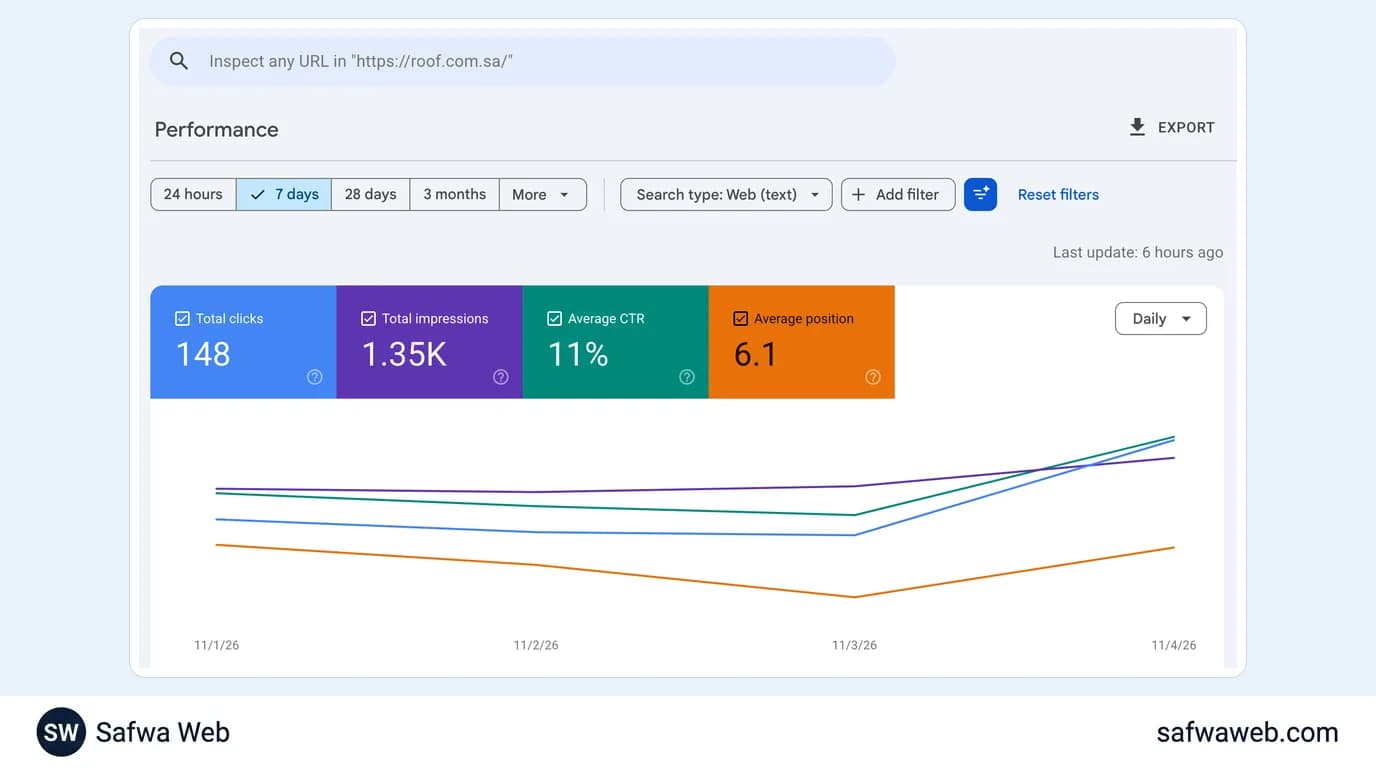
Make Search Console a condition of launch, not something to do later. Make sure your company owns the account with its official email, even if the agency set it up. If your current website doesn’t appear on Google at all, start with our guide on why a website is not showing on Google.
How long does a real estate website take?
A professional real estate company website usually takes us one month. It can stretch to two or three months when every stage goes through a long review, for example when the client’s designer can only review one or two days a week.
You will also find people promising a website in two or three days with AI tools. Those sites look alike, and many things on them break after launch. We don’t work that way.
In our experience, what delays a project is waiting for reviews, not the coding. So decide who reviews on your side, and when, before you start.
The biggest fear: paying before you see the result
One question worries our clients most before we start: we pay the money, but what will the website look like? The worry usually disappears when they see the first version.
So agree on payments tied to stages, and ask to see a first version of the home page and one project page before the large payment. You will find more questions that protect you before you sign in 10 questions to ask before hiring a web design company.
What decides the cost of a real estate website?
The price depends on the number of projects and pages, the admin panel, the CRM connection, the languages, and who writes the content. Ask for a fixed written price that matches your list of requirements line by line, not a number estimated from a PDF.
That is how we price: we match a client’s requirements to a fixed price list, so the number doesn’t change from one client to the next. Current Saudi market prices are explained in our guide to website costs in Saudi Arabia.
Pre-launch checklist for your real estate website
- Every project has a complete page: photos, map, units, handover date, and a “starting from” price.
- The licence number is visible on every project page, and the commercial registration in the footer.
- Every form is tested: the enquiry reached the CRM with the project name and lead source.
- A copy of every enquiry reaches the official company email.
- The WhatsApp button opens a ready message with the project name.
- A Search Console account in your company’s name, with the sitemap submitted.
- The site is fast on mobile and in the languages your buyers read.
- The admin panel is handed over, and your team knows how to add a project and upload a brochure.
- The domain is registered in your company’s name, not the agency’s. Here is how to check who owns your domain.
A real estate website is not measured by how good its photos look, but by how many enquiries reach your sales team. If you want us to review your current site or build a new one, see our real estate web design service.
Frequently asked questions
What pages does a real estate company website need?
Home, About, a projects list, a page for each project, a photo gallery, brochures, and Contact. The project page matters most, because buyers land on it straight from an ad or a search.
Do I have to show my REGA ad licence number on my website?
Yes, on every page that offers a specific property for sale or rent. REGA’s Regulation for Real Estate Marketing and Advertising (May 2026) treats any content published to promote a real estate product as a real estate ad. Show the ad’s details, including its licence number, or just the licence number and a QR code that leads to the rest. A company licensed to market a whole project, such as an off-plan project, does not need a separate ad licence. This is general information, not legal advice.
Should I show unit prices on my website?
Don’t show a fixed price, because prices change, and don’t hide prices completely. Show a “starting from” price taken from a unit that is actually available, so buyers reach you knowing the price level.
How long does it take to build a real estate website?
Usually one month for a professional site, and two or three months if reviews on the client’s side take long. Sites built in two days with AI tools look alike, and many things on them break after launch.
Does a small real estate company need a CRM?
Not at the start. It is enough for every enquiry to reach an official email that a named person reads, with the project name attached. Once you advertise on more than one platform, a CRM becomes necessary to see which project and which platform brought each buyer.
What is Google Search Console, and is it free?
Yes, it is a free Google tool. It shows what people search for before they reach your site, how often you appear and get clicked, and which pages Google has not indexed and why. Set it up in your company’s name on launch day.